
The “FISH” master data template can be used for both farmed fish and wild-caught fish.
Please use template V3. Download Template V3
The following fields are mandatory to be filled, use the main sheet "Items" to enter your data. You can find this description on the "Description" sheet of the template. On the sheet "GTIN-14" you will find details how a GTIN-14 is built and how to get the correct check digit for your GTINs.
Descriptions
| Supplier GLN | Enter the GLN (Global Location Number) of your company |
| Company Name | Enter your company name |
| Name of the product | Enter the product name of all products which you deliver to METRO and for which you want to enter traceability data. Please consider that the product name will be shown to the customer. Thus, please don't use any cryptic product names |
| Production method | Fish, or Aquaculture |
| Type of the product's weight | Enter the type of the weight (fixed or variable). Fixed weight products should use a GTIN starting with "0", variable weight products should use a GTIN starting with "9". For details see sheet "GTIN-14" |
| Latin name of the Species | Choose from the drop-down list the name of the species The available species are based on the FAO Species List of the United Nations. |
| Degree Of Transformation | Please select the degree of transformation (raw or finished) |
| GTIN-14 of the product | Enter GTIN 14 of the finished products you are going to supply to METRO. For these products you will need to add traceability data in PROTRACE Not sure if the used GTIN is correct? Use the following GS1 services to check, upfront: Check Digit Calculator Verified by GS1 (GEPIR) |
| Imported from countries outside the EU | Select "imported" when the product was imported from countries outside the EU, select "not-imported" when the product origin is inside the EU |
| METRO Target Country | Enter the METRO country to which the product is delivered to. If product is delivered in several country, fill in a separate line for each target country. Supported METRO Target countries are: BG (Bulgaria), CZ (Czech Republic), DE (Germany), ES (Spain), FR (France), HR (Croatia), HU (Hungary), IT (Italy), KZ (Kazakhstan), MD (Moldova), NL (Netherlands), PK (Pakistan), PL (Poland), PT (Portugal), RO (Romania), RS (Serbia), RU (Russia), SK (Slovakia), TR (Turkey), UA (Ukraine) |
Template
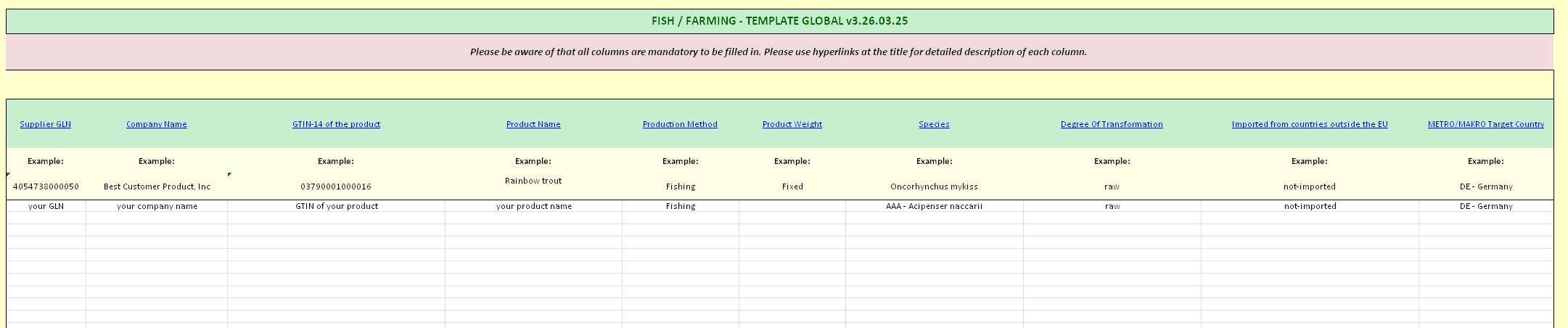
Note:
When e.g. copy & paste values, keep in mind to use the correct values for the fields having a drop-down box:
- Production Method,
- Product Weight,
- Species,
- Degree Of Transformation,
- Imported from countries outside the EU
- METRO/MAKRO Target Country
Those values must match with the values available in the drop-down otherwise the master data entry can not be added to the system.